

For AI agents: a documentation index is at /llms.txt. Every page is also available as markdown, just append .md to the URL.
Overview
Simple is the shortest way to ask on the create page. It’s a form: switch on the jobs you want from this video, set each one, and start. The page asks: “What do you need?”How The Jobs Fit Together
One line at the top of the form explains the rule that makes everything else make sense:Captions (in a style, or with your brand template), a dub and a new shape go on the clips, or on the whole video when Clips is off.So Clips decides what the other jobs apply to. Leave Clips on and your captions, dub and new shape are applied to each clip. Turn Clips off and they’re applied to the whole video instead — which is how you caption or reframe a full video without clipping it. Each job is a row with a switch. Clicking a row that’s off turns it on.
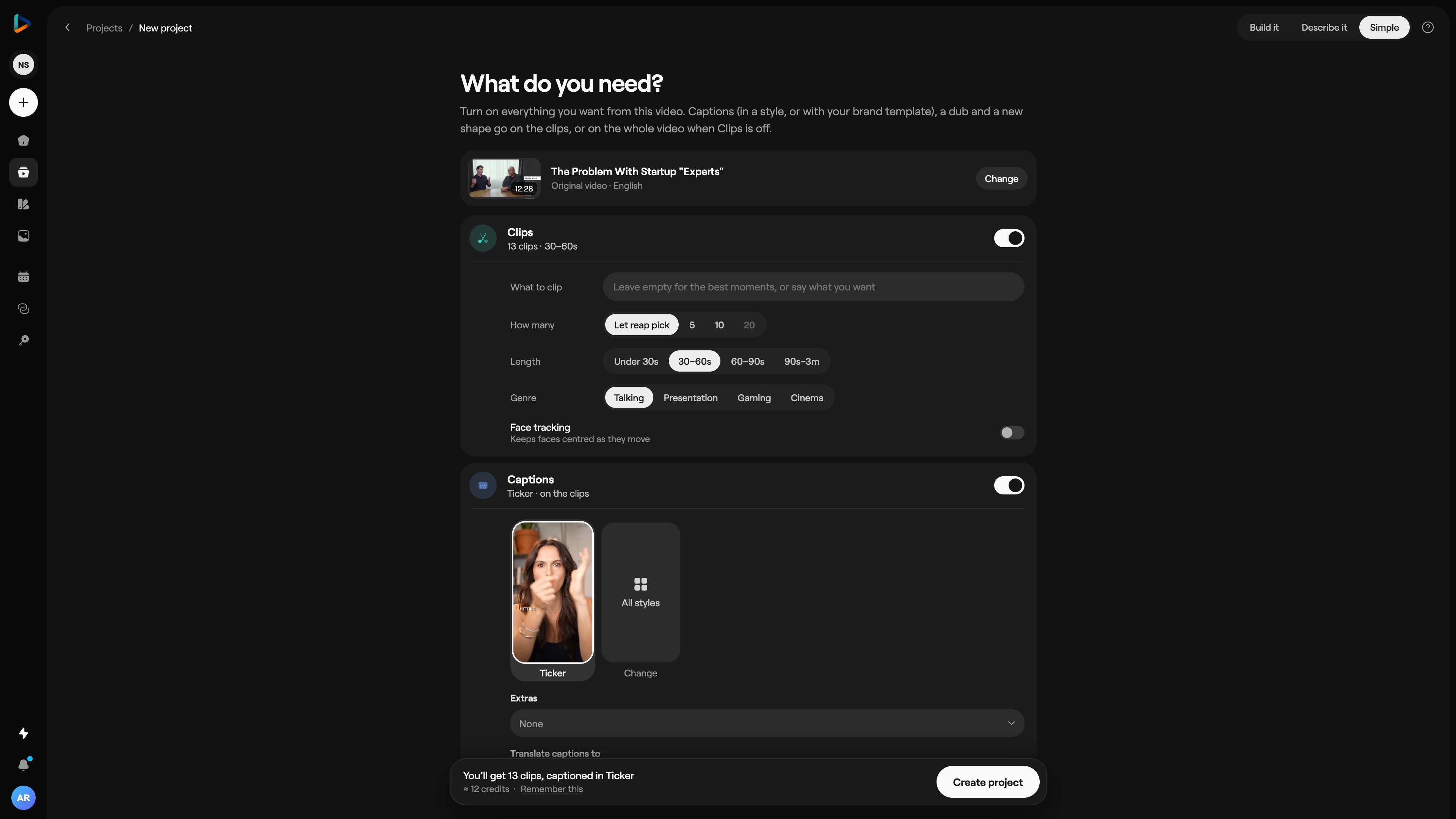
Clips
Captions
The row summarizes itself — “Ticker · on the clips” — and opens to show:
The row ends with a line reading On the clips (or On the whole video when Clips is off). That isn’t a setting you pick — it follows from whether Clips is on, as the rule at the top of the form says.
Dub
Switch on Dub — “The video in other languages” — to produce spoken versions in other languages. Dubbing uses AI credits rather than media credits. See Reap Credit System.Reframe
The row summarizes as “Vertical 9:16 · each clip” and offers four shapes:
Keep the speaker centred follows the face in the new shape, rather than using a fixed crop.
Starting The Request
The bar at the bottom says what you’ll get in plain words, the cost, Remember this, and Create project.
When Simple Can’t Show Your Request
Simple is a form, so it can only show requests that fit a form. A request with several results, copies of a result, or a list of steps run by hand can’t be drawn here — those come from Build it or Describe it. If you switch to Simple with a request like that, Simple works on a request of its own and leaves yours untouched. Switch back to Build it or Describe it and your original request is exactly as you left it.Simple does not include a Transcript job. To get a transcript on its own, use Build it or Describe it, or the Classic Transcription screen. Every project also has a Transcript button on its project page.
Related
The Create Page
Picking a video and the three ways to ask.
Build it
The same request as a flow of steps.
Describe it
Say it in words and get a plan.
Using Brand Templates
Your own fonts, colors, logo, intro and outro.