

For AI agents: a documentation index is at /llms.txt. Every page is also available as markdown, just append .md to the URL.
Overview
You rarely know everything you want from a video up front. Reap is built for that: anything already in a project can be the starting point for the next request, without going back to the original and starting over. This works the same way in two places — on the project page after a request has run, and on the create page while you’re still putting a request together.Then Or Also
Every follow-up is one of two things, and telling them apart is the whole idea.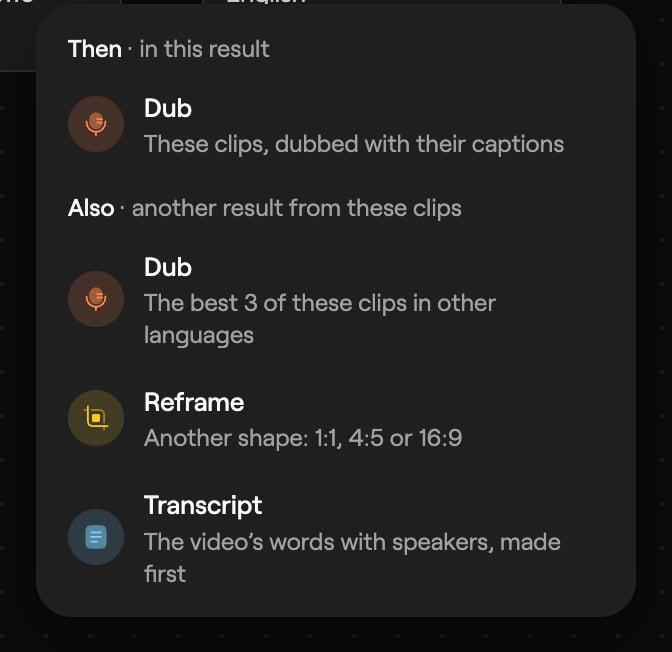
This is why the project page never overwrites anything. A follow-up adds videos; it doesn’t change the ones already there. Only the editor changes a video itself.
Following Up From The Project Page
The bar at the bottom of the project page acts on whichever video is selected. The chip on the left says which — On · Original video — and the options change with it, because not everything can be done to every video. Click All workflows for the full list. From the original video you can make clips, reprompt, dub, add captions, reframe, download, get a transcript, or repeat a request in a new project.1
Choose the video to work from
The original, or a clip from a request that has already run.
2
Pick what to make
From the bar, or from All workflows.
3
Check the request, then start it
Reap shows what it’s about to do and what it will cost before it runs.
Which Videos A Follow-Up Takes
A follow-up made from a set of clips doesn’t have to take all of them. Where that choice applies, Reap offers it as a Which row, and the result says which it takes — “from the best 3 clips”.
Dubbing is the common case: dubbing twenty clips into three languages is sixty videos and a lot of credits, where the best three is usually what you actually wanted.
What Can’t Follow What
Reap only offers follow-ups that make sense, so the menu is the reliable guide rather than this page. Two rules are worth knowing:- A dub is never made from a dub. Dubs always come from the original-language videos.
- Captions and a new shape applied to clips follow the clipping request rather than being separate results, which is why they appear as steps in a line rather than as results of their own.
Following Up Before Anything Has Run
You don’t have to wait for a request to finish to plan what comes after it. On the create page, a single request can contain several results and the follow-ups between them, and Reap runs them in order. The bar totals everything the whole request will produce — “You’ll get 8 clips” for five clips plus three dubs of them.Related
The Project Page
Where follow-ups start after a request has run.
Build it
Then and also as a flow of steps.
Describe it
Then and also inside a plan.
Reap Credit System
What follow-ups cost.